
| HOME | ABOUT |  APPS APPS |
DD-WRT | F@H | WEB SITES | SHOP | SUPPORT US | CONTACT US |
Windows Gadgets
Gadgets for the Vista Sidebar & Windows 7 Desktop.
LCARS Gadget V1.4 (1st Dec 2011) for Windows 7+DOWNLOAD / INSTALL
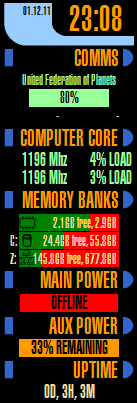 This Windows gadget displays:
- WiFi SSID, signal strength and current bandwidth in use (shows ethernet if WiFi is disconnected),
- Current CPU speed (up to 8 cores, this can be increased in the future if requested) and load per core,
- Total, Free and Used RAM information,
- Disk space free and used including the ability to eject removeable media,
- Main/aux (battery) power status including estimated remaining battery time
(some PCs will only show a percentage due to limitations in Windows),
- The total time since last reboot.
- The gadget has a choice of three slightly different LCARS themes.
BEFORE INSTALLATION:
It is advised you install the lcars.ttf font but you will be reminded if the gadget detects it is missing.
Windows 7:
I highly recommend you install the 7 Sidebar Gadget first.
This gadget restores the Vista style sidebar which prevents windows overlapping your gadgets and also tells you useful things like if caps lock is on.
Windows 8 / 8.1 / 10:
You must install 8 Gadget Pack first, as Microsoft have removed gadgets entirely from the OS.
If you like this gadget please consider a small donation as a thank you.
LCARS Logon ScreenDOWNLOAD
 If you are running Windows 7 you can also add an LCARS background to the login screen.
Download the zip file above and extract it somewhere on your PC.
Run the exe file inside and click Change Logon Screen.
Browse to the Logon Screens directory and choose the file that is the closest to your screen resolution. If you do not know your screen resolution just try any of the files.
Click Test to see how your logon screen looks then enter your logon password to log back in.
If after testing it does not look right, click Change Logon Screen again and try a different file. Depending on your desktop resolution you may find none are perfect, unfortunately I cannot cater for all screen resolutions
The guide above uses the tweaks.com Logon Changer which is included in the download.
The logon screens are based on an old Linux LCARS logon screen and as such I take no credit for their design, I just moved them around a little to fit the login screen.